2025-08-01 — By Siddharth Jain · 6 min read
Railway Reservation System: Simple Booking Form Project Explained
Online booking for railways makes travel convenient in today’s digital age. Ever wondered how such reservation forms are built on web pages? This blog breaks down the basics of an HTML Railway Reservation System example—including structure, key code, and design tips.
🚉 What Does This Project Do?
- Lets users book a train ticket by filling a form with all necessary details.
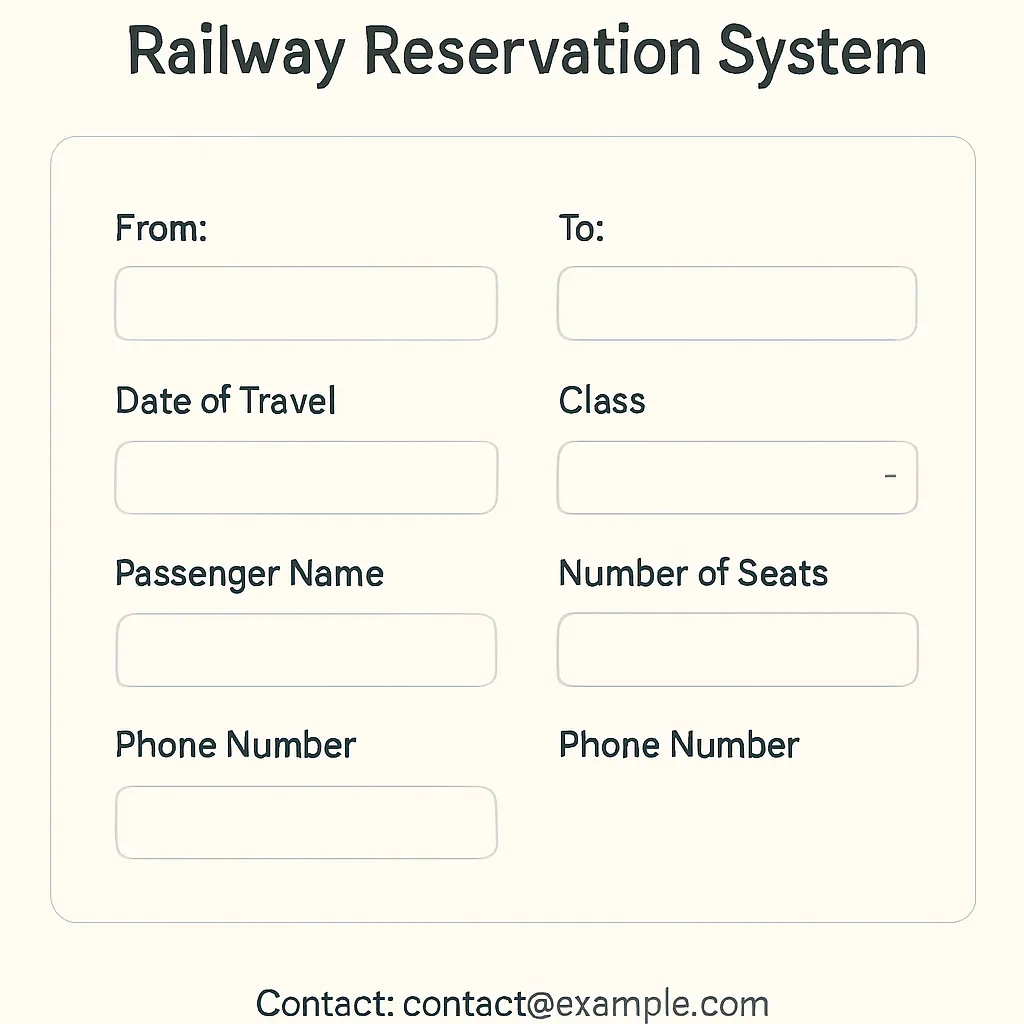
- Showcases real-world form inputs (from, to, date, class, seats, name, phone).
- Demonstrates stylish, user-friendly layout using HTML & CSS only.
🖼️ Features and UI Explanation
- Responsive Design: Looks good on desktops and mobile devices.
- Clear Labeling: Every input or dropdown clearly describes the information needed from the user.
- Modern Styles: Card-like container, rounded boxes, button hover effects, clean font.
- User Guidance: Placeholders instruct what to enter in each field. Required fields prevent incomplete submissions.
✍️ Key Form Fields
| Label | Type | Purpose |
|---|---|---|
| From | Text | Enter starting railway station |
| To | Text | Enter destination station |
| Date of Travel | Date | Choose journey date |
| Class | Dropdown | Select ticket class (Sleeper/AC/First Class...) |
| Number of Seats | Dropdown | 1-4 available, choose as per need |
| Passenger Name | Text | Full passenger name |
| Phone Number | Tel | Contact number |
📂 Code Example (Core Snippet)
From: To: Date of Travel: Class: Select class Sleeper (SL) AC 3 Tier (3A) AC 2
Tier (2A) AC First Class (1A) Number of Seats: Select number of seats 1 2 3 4
Passenger Name: Phone Number:
🎨 Styling Highlights
- .container centers everything with a card look.
- header/footer use consistent blue color for branding.
- Input & buttons: Rounded, stylish, responsive for all screen sizes.
You can further enhance this with JavaScript for validation or backend connection for live bookings!
🙌 Why Try This Project?
- Hands-On HTML/CSS Practice: Master forms, layout, and basic UI/UX.
- Understand Real-World Scenarios: Simulates an actual railway booking experience.
- Open Source & Flexible: Use, remix, or expand it for learning or teaching!
Full code
<!DOCTYPE html>
<html lang="en">
<head>
<meta charset="UTF-8" />
<meta name="viewport" content="width=device-width, initial-scale=1.0" />
<title>Railway Reservation System</title>
<style>
body {
font-family: Arial, sans-serif;
margin: 0;
padding: 0;
background-color: #f4f4f4;
color: #333;
}
header {
background-color: #004aad;
color: white;
text-align: center;
padding: 20px;
}
header h1 {
margin: 0;
font-size: 2em;
}
.container {
max-width: 800px;
margin: 20px auto;
padding: 20 Yellowstone;
background: #fff;
border-radius: 10px;
box-shadow: 0 0 10px rgba(0, 0, 0, 0.2);
}
.form-section {
background-color: white;
padding: 20px;
margin: 20px;
border-radius: 5px;
}
form {
display: flex;
flex-direction: column;
gap: 15px;
}
input,
select {
padding: 10px;
font-size: 1em;
border: 1px solid #ccc;
border-radius: 5px;
width: 100%;
box-sizing: border-box;
}
input[type="submit"] {
background-color: #004aad;
color: white;
border: none;
cursor: pointer;
transition: background-color 0.3s;
}
input[type="submit"]:hover {
background-color: #003087;
}
.form-group {
margin-bottom: 15px;
}
label {
font-weight: bold;
margin-bottom: 5px;
display: block;
}
footer {
text-align: center;
padding: 20px;
background-color: #004aad;
color: white;
position: fixed;
bottom: 0;
width: 100%;
}
@media (max-width: 600px) {
.container {
margin: 10px;
padding: 10px;
}
header h1 {
font-size: 1.5em;
}
}
</style>
</head>
<body>
<header>
<h1>Railway Reservation System</h1>
</header>
<div class="container">
<div class="form-section">
<h2>Book Your Train Ticket</h2>
<form>
<div class="form-group">
<label for="from">From:</label>
<input
type="text"
id="from"
placeholder="Enter starting station"
required
/>
</div>
<div class="form-group">
<label for="to">To:</label>
<input
type="text"
id="to"
placeholder="Enter destination station"
required
/>
</div>
<div class="form-group">
<label for="date">Date of Travel:</label>
<input type="date" id="date" required />
</div>
<div class="form-group">
<label for="class">Class:</label>
<select id="class" required>
<option value="" disabled selected>Select class</option>
<option value="SL">Sleeper (SL)</option>
<option value="3A">AC 3 Tier (3A)</option>
<option value="2A">AC 2 Tier (2A)</option>
<option value="1A">AC First Class (1A)</option>
</select>
</div>
<div class="form-group">
<label for="seats">Number of Seats:</label>
<select id="seats" required>
<option value="" disabled selected>Select number of seats</option>
<option value="1">1</option>
<option value="2">2</option>
<option value="3">3</option>
<option value="4">4</option>
</select>
</div>
<div class="form-group">
<label for="name">Passenger Name:</label>
<input
type="text"
id="name"
placeholder="Enter passenger name"
required
/>
</div>
<div class="form-group">
<label for="phone">Phone Number:</label>
<input
type="tel"
id="phone"
placeholder="Enter phone number"
required
/>
</div>
<input type="submit" value="Book Now" />
</form>
</div>
</div>
<footer>
<p>© 2025 Railway Reservation System. All rights reserved.</p>
</footer>
</body>
</html>
